
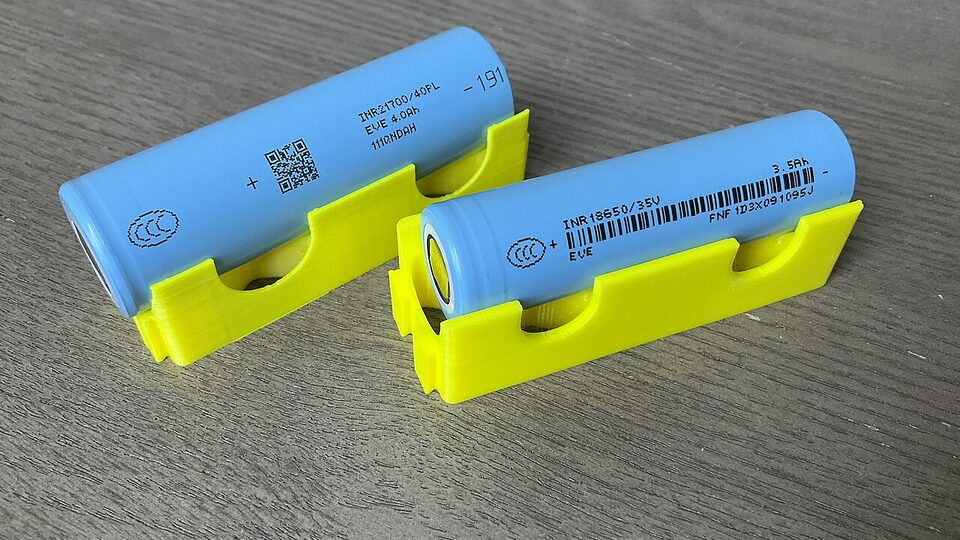
Your phone, your laptop, your wireless earbuds and most electric cars all run on the same kind of battery: lithium-ion. It holds a lot of energy for its weight, it can be recharged hundreds of times, and it has no “memory effect”. But it also wears out slowly with every charge, and how you treat it changes how fast. This guide explains what happens inside a lithium-ion battery, why it loses capacity, how to read your own battery’s health, and the habits that really make it last longer.
What is inside a lithium-ion battery
A battery pack is made of one or more cells. Each cell has four main parts:
- The anode (negative side), usually made of graphite, a form of carbon arranged in layers.
- The cathode (positive side), a lithium metal oxide. Common types are lithium cobalt oxide in many phones, nickel manganese cobalt (NMC) in laptops and many cars, and lithium iron phosphate (LFP) in some cars, power banks and home batteries.
- The electrolyte, a liquid (or gel) containing a lithium salt, which lets lithium ions move between the two sides.
- The separator, a thin porous plastic film that keeps the anode and cathode from touching while letting ions pass through.
Around the cells sits a small circuit board, the battery management system (BMS). It measures voltage, current and temperature, stops charging when the cells are full, cuts power if they get too empty or too hot, and estimates the percentage you see on screen.
How charging and discharging work
The trick of a lithium-ion cell is that lithium ions shuttle back and forth between the two sides:
- When you use the device (discharging), lithium ions leave the graphite anode, travel through the electrolyte and settle into the cathode. At the same time, electrons leave the anode through the wires of your device, powering it on their way to the cathode.
- When you charge, the charger pushes the electrons and ions the other way, packing the lithium back into the layers of the graphite, ready for next time.
A typical lithium-ion cell has a nominal voltage of about 3.6 to 3.7 volts and is full at about 4.2 volts (LFP cells run lower: about 3.2 volts nominal, about 3.65 volts full). Packs put cells in series to reach higher voltages; a laptop battery might be three or four cells in a row.
Chargers use a two-step method called CC/CV: first a constant current fills the cell quickly up to about 80%, then a constant voltage tops it off while the current slowly drops. That is why the last 20% of a fast charge always takes longer than the first.
Capacity: mAh, Wh and what the numbers mean
Phone batteries are usually rated in milliamp-hours (mAh), for example 4,500 mAh. That number alone does not tell you the energy stored, because it ignores voltage. The better unit is the watt-hour (Wh): voltage multiplied by amp-hours. A 4,500 mAh cell at 3.85 volts holds about 17.3 Wh. Laptops are usually rated in Wh directly, often 40 to 100 Wh.
Watt-hours also matter when you fly. In the United States, the FAA requires spare lithium batteries and power banks to travel in carry-on bags, not checked luggage. Batteries up to 100 Wh are allowed; those between 100 and 160 Wh need airline approval.
Why batteries wear out
Every lithium-ion battery slowly loses capacity, even when it is not used. The main causes:
- The SEI layer grows. On the very first charge, a thin protective film called the solid electrolyte interphase forms on the anode. It is necessary, but it keeps growing slowly over the battery’s life, trapping a little lithium each time. Trapped lithium can no longer carry charge.
- Heat speeds everything up. High temperature is the number one enemy. A phone left on a car dashboard in Phoenix in July, or a laptop gaming for hours on a soft blanket, ages much faster.
- Being full for a long time. A cell sitting at 100% (high voltage) ages faster than one sitting in the middle, especially when it is also warm.
- Fast charging in the cold. Charging hard at low temperatures can cause lithium plating: metallic lithium forms on the anode instead of slipping into it. This permanently reduces capacity and, in extreme cases, is a safety risk. That is why many phones and electric cars slow down charging in the cold.
- Charge cycles. One cycle is 100% of capacity used, whether in one go or as several partial charges (for example two days of 50% each). Many phone batteries are designed to keep about 80% of their original capacity after several hundred to about a thousand full cycles, depending on the model.
Check your own battery’s health
Every major system can tell you how worn your battery is:
- Windows laptops: open Command Prompt or PowerShell and run
powercfg /batteryreport. It saves an HTML report and prints where. Open it and compare DESIGN CAPACITY with FULL CHARGE CAPACITY. - Mac: System Settings, Battery, then the information button next to Battery Health.
- iPhone: Settings, Battery, Battery Health (and Charging on newer models).
- Android: varies by brand. Many recent phones show it under Settings, Battery or Device care; others only show it in diagnostics apps from the manufacturer.
Here is the relevant part of a real report from a Windows laptop we checked while writing this article:
DESIGN CAPACITY        54,891 mWh
FULL CHARGE CAPACITY   40,470 mWh
CYCLE COUNT            210
That battery now holds 40,470 / 54,891, about 74% of its original capacity, after 210 cycles. That is more wear than average for so few cycles, and it is typical of a laptop that spends most of its life plugged in at 100% and getting warm. It still works fine; it just runs out sooner than it did when new. Most manufacturers consider a battery “worn” at around 80% and offer replacements under warranty only below a set threshold, so check yours before you pay for a new one.
Habits that actually help
- Keep it cool. Do not leave devices in a hot car, in direct sun or under a pillow while charging. If a phone gets hot while fast charging, take it out of a thick case.
- Use the built-in charge limits. iPhones have Optimized Battery Charging (and on newer models an 80% limit option), many Android phones have Adaptive or Protect Battery settings that stop at 80% or 85%, and many laptops from Lenovo, Dell, HP, ASUS and Apple can cap charging at around 80% when they are mostly plugged in. This is the single most useful setting for a laptop that lives on a desk.
- Partial charges are fine. Lithium-ion has no memory effect. You do not need to run it down to 0% before charging; in fact, deep discharges are harder on it. Charging from 30% to 80% is gentler than 0% to 100%.
- Fast charging is OK, heat is not. Modern fast charging is designed to be safe and slows down as the battery fills. Use it when you need it; use a slower charger overnight if you like.
- Store at about half charge. If you put a device away for months, leave it around 40 to 60% and switch it off. Check it every few months.
Safety: when to stop using a battery
Lithium-ion batteries are very safe when undamaged, but they store a lot of energy. If a cell is damaged or badly made, it can overheat in a chain reaction called thermal runaway, which can cause fire. Stop using a device and take it to a repair shop or recycler if:
- the battery is swollen (a laptop trackpad lifting, a phone screen popping out, a case that no longer closes);
- it gets very hot without heavy use, or smells sweet or chemical;
- it was crushed, punctured or soaked.
Never throw lithium-ion batteries in household trash. They cause fires in garbage trucks and recycling plants. Many electronics and home-improvement stores in the U.S. have free battery drop-off bins.
Key takeaways
- Lithium ions move from anode to cathode when you use a device and back when you charge it.
- Capacity in Wh (volts times amp-hours) is the real measure of stored energy.
- Heat and sitting at 100% for long periods age batteries most; partial charges and an 80% limit help.
- Check health with
powercfg /batteryreporton Windows or the Battery Health screens on Mac and iPhone. - Swollen or damaged batteries must not be used and must not go in the trash.
More tutorials like this

Smart Home Devices Explained: Wi-Fi, Zigbee, Thread, Matter and Your Privacy
How smart home devices connect, what Wi-Fi, Zigbee, Thread and Matter mean, why local control matters, and how to keep your smart home secure…
How a CPU Works: Cores, Threads, Cache and Why Clock Speed Isn’t Everything
What a CPU really does, what GHz, cores, threads and cache mean, how performance and efficiency cores differ, and how to read the specs…

How Robots Work: Sensors, Actuators and the Brain Behind Modern Robotics
How robots sense, think and act: the sensors, motors and controllers inside them, the software that ties it together, what AI adds, and why…
